Why most SOPs fail the 3 AM test and how to create procedures that workers can access and follow during actual operations. Without proper standard operating procedures sops, things go wrong.
11 min read
2:47 AM. Chemical leak alarm at a Belgian pharmaceutical facility. The neutralization procedure exists.perfectly written, ISO-compliant, translated into three languages. Location: SharePoint folder on a locked computer two floors away. Cost of improvisation: €340,000.
This scenario repeats across manufacturing, pharma, and logistics operations worldwide. Not because procedures don't exist, but because they're inaccessible when workers need them most.
A standard operating procedure (SOP) is a documented set of step-by-step instructions designed to help workers perform routine operations consistently and safely. But definition doesn't equal effectiveness. The most comprehensive SOP becomes useless if workers can't access it in 60 seconds during an emergency, night shift, or equipment failure.
Why Most Standard Operating Procedures SOPs Fail the 3 AM Test

The problem isn't documentation quality. It's accessibility reality.
Traditional SOP development obsesses over perfection: comprehensive content, detailed approval workflows, elegant formatting. Meanwhile, the Romanian operator on night shift can't find the cleaning protocol because it's locked in a supervisor's computer. The temporary worker speaks limited English and skips safety steps because the procedure assumes native fluency.
The SharePoint Graveyard
Procedures buried in folder hierarchies that require corporate login and VPN access. Night shift workers often lack both.
The Language Barrier
SOPs written in corporate English for multilingual workforces. 30-50% of EU production workers are non-native speakers.
The Desktop Assumption
PDFs designed for office computers, unreadable on smartphones. Shop floor workers use phones, not desktop terminals.
The Update Lag
Procedures outdated by equipment changes or process improvements. Workers ignore SOPs they know are wrong.
According to TechTarget's research on SOP implementation, most organizations follow the same flawed pattern: write comprehensive procedures, store them centrally, train workers once, then wonder why compliance drops during actual operations.
The Hidden Cost of Inaccessible SOPs in Manufacturing
Poor SOP accessibility doesn't just cause inefficiency. It creates measurable financial impact across multiple vectors.
Knowledge Loss During Transitions: When experienced operators leave, their tribal knowledge vanishes unless it's captured in accessible formats. A machinist with 15 years on a specific CNC line knows 200+ micro-adjustments that never made it into the official procedure. Their replacement takes 18 months to reach equivalent competency, assuming the knowledge transfers at all.
Error Multiplication Across Shifts: Quality issues compound when procedures are inaccessible. Day shift develops a workaround for spindle vibration. Night shift doesn't know about it. Weekend crew improvises differently. Monday's quality meeting reveals three different methods and a batch rejection.
| Cost Factor | Traditional SOPs | Accessible SOPs | Annual Impact |
|---|---|---|---|
| Knowledge Transfer | 18 months to proficiency | 6 weeks to proficiency | €120K per departure |
| Error Rates | 8-12% on complex procedures | 3-4% with visual guides | €50K per production line |
| Emergency Response | 15-45 minutes to find procedure | 60 seconds via QR code | €200K per incident |
| Compliance Audits | Paper trails, manual tracking | Digital proof, automatic logs | €30K per audit cycle |
These numbers reflect actual operational experience from companies implementing point-of-need quality control systems and knowledge retention protocols.
The SOP Accessibility Maturity Model
Most organizations focus on documentation completeness rather than operational accessibility. This maturity model measures SOP effectiveness by access speed and usage reality, not approval committee satisfaction.
Perfect Documentation, Impossible Access
Comprehensive SOPs stored in central systems. Requires IT access, assumes desktop usage, written in single language. Beautiful documents that workers can't reach when needed.
Digital SOPs That Still Fail Under Pressure
Procedures moved online but still require login credentials, corporate network access, or specific devices. Better than paper but breaks down during emergencies or for temporary workers.
Point-of-Need Access Systems
SOPs accessible via QR codes on equipment, translated automatically, optimized for mobile viewing. Workers scan and go, no credentials required. Procedures follow the work, not the office.
Self-Updating Knowledge Capture
Video-based procedure capture that creates SOPs in 60 seconds. Expert knowledge flows directly into accessible formats without documentation bottlenecks. Procedures stay current with actual practice.
Level 1: Perfect Documentation, Impossible Access
Level 1 organizations produce beautiful SOPs that fail operationally.
Characteristics include exhaustive documentation standards, multi-stage approval workflows, and central storage systems designed for compliance rather than usage. These SOPs pass audits but don't prevent errors because workers can't access them during actual operations.
The SharePoint Problem: Most Level 1 SOPs live in SharePoint or similar document management systems. Finding a specific procedure requires navigating folder hierarchies, using search functions that often fail, and having corporate credentials that temporary workers lack. A chemical spill doesn't wait for IT support.
The PDF Fallacy: Level 1 SOPs are designed as PDFs optimized for printing or desktop viewing. On a smartphone.the device most workers actually carry.these PDFs require zooming, scrolling, and constant orientation changes. A 15-step procedure becomes a frustrating navigation exercise.
This approach assumes workers operate from fixed terminals with reliable network access. Reality: maintenance happens in cramped spaces, quality checks occur on moving lines, and emergency responses happen wherever the problem appears.
Level 2: Digital SOPs That Still Fail Under Pressure
Level 2 represents most "digital transformation" SOP initiatives. Procedures move online but retain accessibility barriers that matter during actual operations.
Common implementations include company intranet portals, learning management systems, and mobile apps that require authentication. These solutions improve upon paper-based systems but break down precisely when SOPs matter most: during emergencies, equipment failures, or when temporary workers need immediate guidance.
The Authentication Problem: Level 2 systems require user accounts, passwords, and often VPN connections. Night shift workers frequently lack these credentials. Contractors and temporary staff rarely get them. Emergency response can't wait for password reset requests.
The Network Dependency: Digital SOPs that require continuous internet connectivity fail in industrial environments with poor coverage. Maintenance areas, storage facilities, and older plant sections often have unreliable wireless access.
A European automotive plant discovered this during a weekend equipment failure. The troubleshooting procedure existed in their new digital system, but the maintenance area had no WiFi coverage. The technician spent 40 minutes walking to find a connected terminal, then printed the procedure anyway.
Level 3: Point-of-Need Standard Operating Procedures
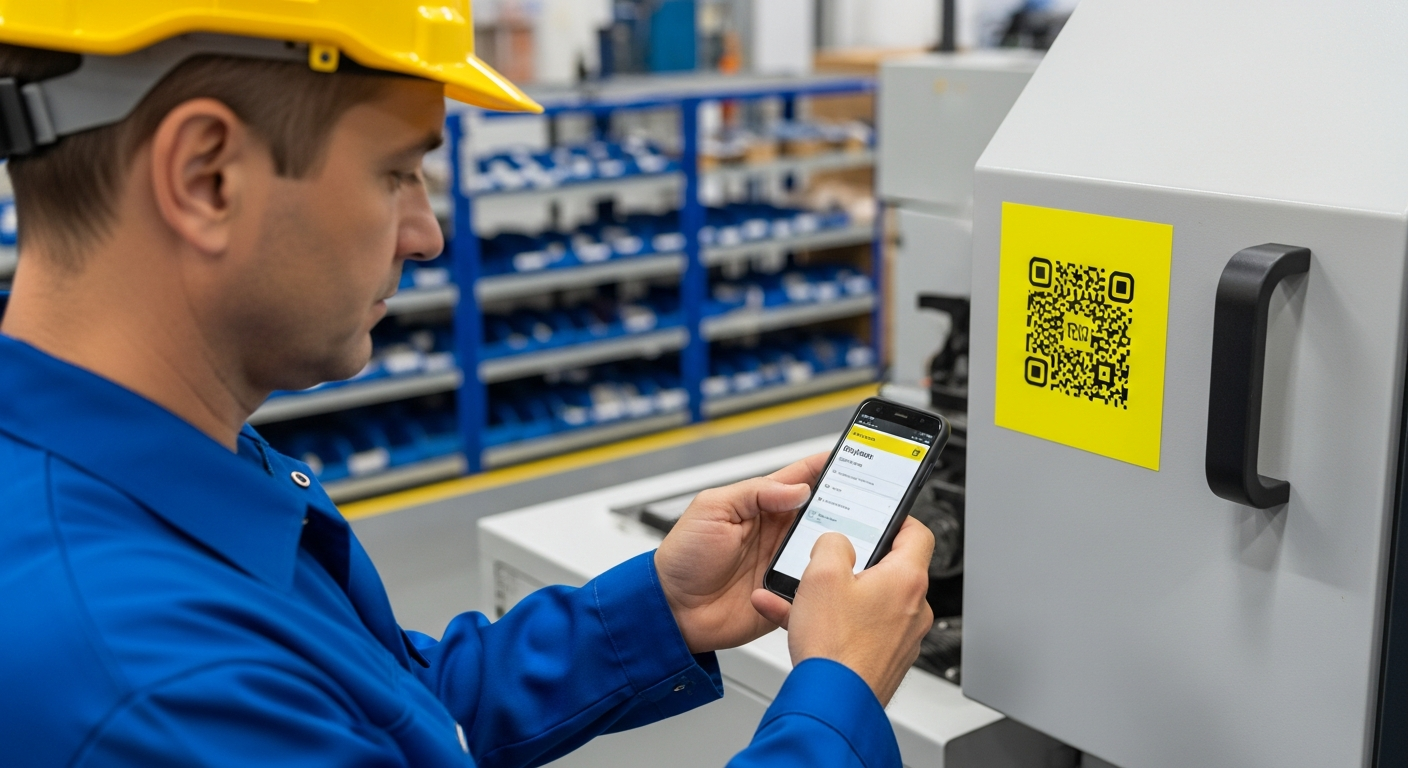
Level 3 systems eliminate access friction through strategic deployment at the point of need.
QR codes placed directly on equipment, workstations, or safety stations provide instant access to relevant procedures. Workers scan with their personal smartphones.no app downloads, no login credentials, no corporate network required. The SOP appears immediately in their browser.
Multilingual Reality: Level 3 SOPs adapt automatically to worker preferences. The same QR code serves procedures in 200+ languages through AI translation that maintains technical accuracy while adapting to regional terminology.
Mobile-First Design: These SOPs are designed specifically for smartphone viewing. Steps display one at a time with clear images and concise text. Workers swipe through procedures like social media.intuitive navigation that requires no training.
Offline Capability: Once accessed, Level 3 SOPs cache locally on the device. Workers can reference procedures even without network connectivity, crucial for maintenance areas or during network outages.
This approach recognizes that SOPs serve workers, not approval committees. A maintenance technician troubleshooting hydraulic pressure doesn't need comprehensive background information.they need the specific steps to resolve the immediate problem.
Level 3 implementation requires thinking differently about SOP distribution. Instead of centralized document libraries, procedures follow the work through physical QR codes that travel with equipment or stay permanently at workstations.
From Expert Knowledge to Accessible SOPs: The 60-Second Method

Traditional SOP creation takes weeks. Expert knowledge capture through video takes minutes.
The breakthrough insight: don't ask experts to become writers. Ask them to demonstrate their expertise while someone films. AI handles the documentation, maintaining the expert's actual workflow rather than forcing it into corporate writing templates.
Film the Expert
Use any smartphone to record the person who knows the procedure best. No script, no preparation. Capture their natural workflow including verbal explanations and visual cues.
AI Creates Steps
Upload the video to Manual.to where AI automatically identifies discrete steps, generates text descriptions, and creates visual guides. Processing time: approximately 60 seconds.
Expert Reviews and Approves
The expert reviews AI-generated steps, adds safety warnings or tips, and approves the final procedure. No writing required.just validation of accuracy.
Deploy Instantly
Generate QR code and place at point of need. Procedure becomes immediately accessible in any language, on any device, without corporate network requirements.
This method captures not just the official steps but the micro-adjustments and situational awareness that experienced workers develop over years. A sensor calibration procedure might officially have 8 steps, but the expert knows to listen for a specific sound on step 3 and check for vibration patterns on step 6. Video capture preserves these nuances.
Language Advantage: Experts can demonstrate in their native language while the final SOP becomes accessible in 200+ languages. A German engineer's expertise becomes immediately usable for Turkish production workers through automatic translation that maintains technical precision.
This approach doesn't work for everything. Complex troubleshooting trees with multiple decision branches still benefit from traditional documentation. But for 80% of routine procedures, video capture creates more accurate and accessible SOPs in a fraction of the time.
What Most SOP Guides Get Wrong About Implementation
The conventional wisdom focuses on writing perfect procedures and getting management approval. This completely misses the operational reality: the best-written SOP is worthless if workers can't access it in 60 seconds.
Customer data from 500+ manufacturing implementations shows that accessibility beats perfection every time. A simple visual guide accessible via QR code prevents more errors than a comprehensive PDF locked in SharePoint. Workers need procedures that follow them to the work, not procedures that require them to leave the work.
SOP Template That Workers Actually Use
Most SOP templates optimize for approval committees rather than operational reality. This template prioritizes speed of access and clarity of execution.
| Element | Traditional SOP | Worker-Centered SOP |
|---|---|---|
| Opening | Background, purpose, scope (3 paragraphs) | Goal in one sentence, safety warnings upfront |
| Steps | Detailed paragraphs with sub-bullets | One action per step, visual confirmation for each |
| Length | 15-25 pages comprehensive | 8-12 steps maximum, mobile-optimized |
| Language | Technical precision, corporate tone | Action verbs, conversational clarity |
| Troubleshooting | Appendix with flowcharts | Inline tips at relevant steps |
Template Structure:
1. Immediate Context (1 sentence)
"This procedure calibrates pressure sensors on Line 3 mixing equipment."
2. Safety First (Red highlight)
"Lock out power at Panel B before beginning. Wear safety glasses."
3. Required Tools (Visual checklist)
Icons showing specific tools with part numbers.
4. Step-by-Step with Visual Confirmation
Each step includes: action description, photo or video clip, expected result or confirmation signal.
5. Completion Check
"System shows green status light and pressure reads 2.3 bar ± 0.1"
6. Troubleshooting (Inline)
"If pressure reads low, check connection at Point C before recalibrating."
This template adapts to lean manufacturing system principles by eliminating waste in procedure access. It supports poka yoke error prevention through visual confirmations and kaizen continuous improvement through simplified update processes.
Integration with Quality Systems and Manufacturing Execution
Accessible SOPs don't replace existing quality management systems.they enhance them by providing the missing link between digital oversight and shop floor execution.
ERP Integration: Modern manufacturing relies on integrated systems where SOPs connect to work orders, material requirements, and quality checkpoints. QR code-based procedures can trigger completion confirmations that flow directly to ERP systems, providing real-time visibility into process compliance.
MES Connectivity: Manufacturing execution systems track production in real-time but often lack the granular procedure guidance that operators need for complex tasks. Point-of-need SOPs bridge this gap by providing step-by-step instructions that complement MES data collection.
Compliance Documentation: Accessible SOPs generate audit trails that regulatory bodies increasingly expect. Digital timestamps show who accessed which procedure when, providing compliance evidence that paper-based systems cannot match. This becomes critical for FDA, ISO 9001, and other quality certifications.
Continuous Improvement Integration: Gemba walk observations often identify procedure deviations that indicate either training gaps or process improvements. When SOPs are accessible and trackable, these insights flow directly into improvement cycles.
The key insight: accessible SOPs enhance rather than complicate existing systems by providing the human-readable interface that complex manufacturing software often lacks.
Measuring SOP Effectiveness Beyond Compliance
Traditional SOP metrics focus on compliance percentages and audit results. Operational metrics matter more: access speed, error reduction, and knowledge transfer effectiveness.
Access Metrics: Time from problem identification to procedure access. Target: under 60 seconds from recognition to first step. Night shift access rates compared to day shift. Language preference distribution across workforce.
Usage Analytics: Which procedures get abandoned mid-process (indicating clarity problems). Step-by-step completion rates. Mobile vs desktop access patterns. Geographic or shift-based usage variations.
Error Prevention: Before/after error rates for specific procedures. First-pass yield improvements. Customer complaint reductions related to process deviations. Insurance claims related to workplace incidents.
Knowledge Transfer Speed: Time for new workers to achieve competency on specific procedures. Supervisor intervention frequency. Training time reduction for standard tasks.
These metrics shift focus from "Did we document everything?" to "Can workers actually use what we documented?" The difference determines whether SOPs prevent problems or create compliance theater.
What makes a standard operating procedure effective in practice?
How do you create SOPs for multilingual teams?
What's the difference between SOPs and work instructions?
How often should SOPs be updated?
What format works best for mobile SOP access?
How do you measure SOP compliance in real-time?
Can video-based SOPs work for complex troubleshooting procedures?
How do QR code SOPs integrate with existing quality management systems?
Sources
Create SOPs That Work When It Matters
Turn expert knowledge into accessible procedures in 60 seconds.
Try NowBook a Demo